

The Visual Crossing Weather API is a RESTful API that provides historical and forecast weather data. API queries are secured by the use of an API key which uniquely identifies the account. This account is associated with billing information, plans and feature level permissions.
Your Visual Crossing Weather API key authenticates API requests for your account. If you believe the key has been exposed or compromised, you should generate a new key and update any applications that use the old one. This article describes how to change your weather API key. If you do not have an API key, you can sign up for a free account.
Please note that changing your API key takes place immediately. Any subsequent queries using the previous API key will fail.
Some Visual Crossing plans offer multiple API keys. Multiple keys allow you to have different keys for different environments and also to rotate keys more easily. Read more about maintaining multiple API keys.
Steps to change your API key
Step one – navigate to your account information
You can access your account information at https://www.visualcrossing.com/account. To open this page you must enter your user email and password.
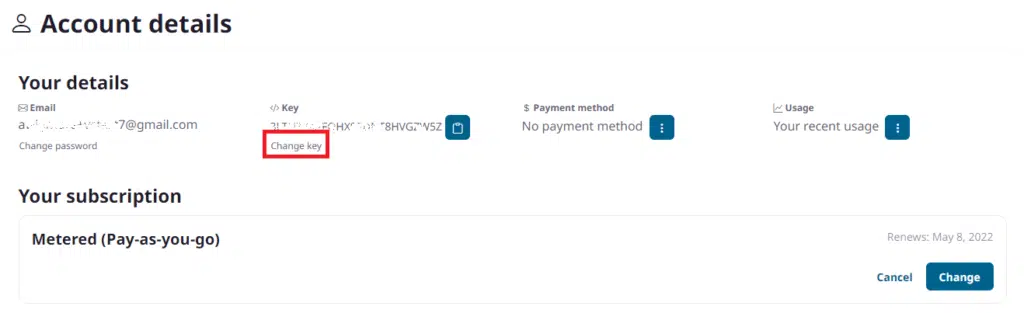
Step two – click to change the API key
Click ‘Change key’ below the current API key.
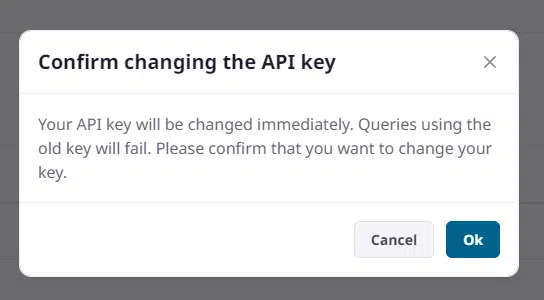
Step three- confirm that you want to change the key
You must confirm that you want to change the API key. The change to the key will be immediate.
Step four – replace the current key with the new key
Replace all existing API key usage with the updated key value.
Questions or need help?
For immediate help, try our AI Support Assistant, which can answer questions about Visual Crossing Weather data, APIs, documentation, and common technical issues. You can also post questions on our actively monitored support forum or contact our Support Team directly.