

To manage your personal account information like billing information, account email or tax details, please log into your account under https://www.visualcrossing.com/account .
In the ‘Account details’ section you see the options:’Change username’ and ‘Address, tax & invoice’.
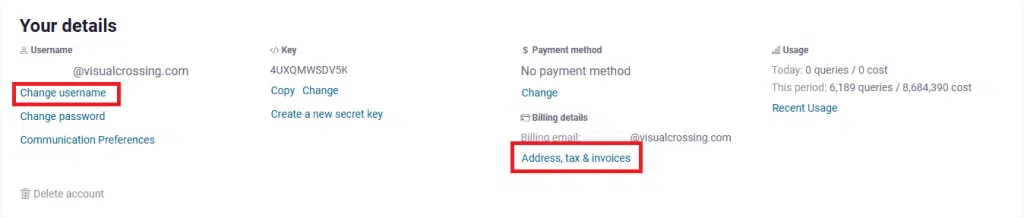
Clicking on the ‘Change username’ option allows you to change you Visual Crossing username email and your billing email. They can remain different if preferred. Please note that your Visual Crossing account email should be a monitored account to ensure receipt of important notifications.
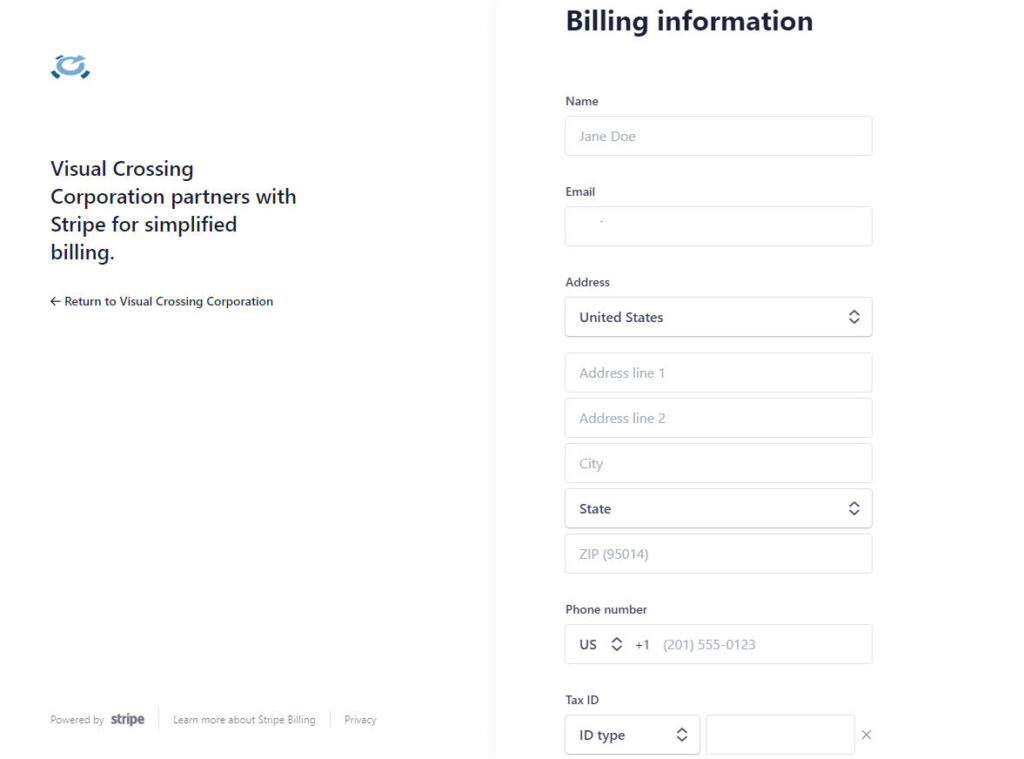
Clicking the ‘Address, tax & invoice’ link will open the ‘Billing Information’ editor of your billing platform partner Stripe.
You can edit Name, Email Address, Address, Phone Number and Tax ID here. This information will appear on your next invoice when saved.
NOTE: Changing the email address will effect the email the invoice is sent to AND the email used to log into your account page!
Downloading invoices and receipts
In the same Stripe Account portal, you can also view and download invoices and receipts in the ‘Invoice history’ section. Clicking on any invoice allows you to view and download the invoice and receipt. If there are any unpaid invoices, clicking on an unpaid invoice allows you to pay the invoice directly.
Questions or need help?
For immediate help, try our AI Support Assistant, which can answer questions about Visual Crossing Weather data, APIs, documentation, and common technical issues. You can also post questions on our actively monitored support forum or contact our Support Team directly.